On this page
- At a glance
- How we tested them
- Take enquiries: forms plugins
- Make sure the emails arrive: email plugins
- Keep spam out of your forms: spam plugins
- Get found on Google: SEO plugins
- Tell search engines about changes: IndexNow plugins
- Count visitors, once they agree: analytics and consent plugins
- Catch broken links before visitors do: link-checking and 404 plugins
- Show an offer or a notice: popup and bar plugins
- Check a page before it goes live: approval and change-history plugins
- Keep a copy you can take anywhere: backup and export
- Serve two languages: translation plugins
- Pictures that load fast and describe themselves: image plugins
- Change a layout without code: page-building plugins
- Take bookings and sell tickets: events plugins
- Jobs EmDash already does: search, speed and roles
- For a shop or a members area
- Accessibility checks and newsletters
- Where EmDash plugins come from, and what they cost
- Change log
A business site has a few jobs to do. Enquiries must reach you, Google must find you, and links must keep working. This page takes each job in turn. It says what EmDash does on its own, then which plugins do the rest, who sets each one up and what else it needs. On 9 November 2026 we installed 42 plugins from 30 publishers on a fresh EmDash 1.4.0 site, one at a time, and used each one for its job as far as our test allowed; each entry says what was not run, and why. Each one has its code in public and fits a business site, and all but one were updated since 28 September 2026. We make six of them. Each of ours is marked (ours), listed last in its job and checked with the same steps as the others. Nobody paid to be listed, there are no affiliate links, and no plugin gets a score.
At a glance
Each line is one job: what EmDash does on its own, then the plugins on this page. “You” means you install it from Registry in the admin, once your developer has switched the Registry on; “developer” means your developer adds it to the site’s code.
- Take enquiries. On its own: nothing; EmDash’s official Forms plugin collects them. Plugins: Contact Forms (you), Core Forms (developer), Forms (developer), Lead Capture (developer, for sign-ups in exchange for a file), and Lead Delivery (ours; you) to send enquiries on.
- Make sure the emails arrive. On its own: sends nothing until an e-mail plugin is set up. Plugins: Mail API (you), SMTP (you or developer).
- Keep spam out of your forms. On its own: the Forms plugin’s hidden trap field, on by default. Plugins: NoSpam (developer).
- Get found on Google. On its own: an SEO box on every page, a sitemap and basic structured data. Plugins: QuixSEO (you), Schema Identity (you), SEO Suite (you), SEO & Schema Markup (ours; you or developer).
- Tell search engines about changes. On its own: a sitemap. Plugins: IndexNow (you, with your developer once).
- Count visitors, once they agree. On its own: nothing. Plugins: Cookie Consent (you, with your developer once), Header & Footer Code (developer), Umami Analytics (you, with your developer once), Analytics & Cookies (ours; developer).
- Catch broken links before visitors do. On its own: a list of missing pages, redirects, and a redirect when a page’s address changes. Plugins: Backlinksbeheer Link Check (you), Custom 404 (developer), SiteGraph Lite (you), Site Health & Broken Links (ours; you or developer).
- Show an offer or a notice. On its own: nothing. Plugins: Announcement Bar (you, with your developer once), Site Notice (developer), Popups (ours; developer).
- Check a page before it goes live. On its own: roles, where a Contributor cannot publish. Plugins: Audit Log (you), EmDash Preflight (you), Publish Check (you), Simple History (you), Content Approval (ours; you or developer).
- Keep a copy you can take anywhere. On its own: database copies and a whole-site export, from EmDash’s docs. Plugins: GitHub Sync (you).
- Serve two languages. On its own: pages in several languages. Plugins: LinguaDash (you).
- Pictures that load fast and describe themselves. On its own: a media library with a description for each use of a picture. Plugins: AI Alt Text (you), R2 Image Variants (developer).
- Change a layout without code. On its own: the blocks your theme offers. Plugins: EmVB (developer).
- Take bookings and sell tickets. On its own: nothing. Plugins: semics Events (you).
- Search, speed and roles. On its own: yes. No plugin needed.
How we tested them
We set up a fresh EmDash 1.4.0 site from its Marketing template, on Node.js on our own computer, in a throwaway container. We added a Body text field to its pages, so plugin blocks had somewhere to go. Before each plugin we put the site back to the same starting copy, so no plugin saw another’s leftovers.
Plugins from the Registry were installed from the site’s own admin, as an owner would. On Node.js the Registry needs EmDash’s sandbox, so we added it first. Plugins from npm were added to the site’s code, as a developer would. Then we did the job each plugin is for where our test allowed, looked at the public site, and removed the plugin again.
We used no accounts and no keys. Where a plugin’s job needs an outside account, such as an e-mail service, its entry says “not run: needs a … account”. That is not a failure. Our test site ran on Node.js, not on Cloudflare; where a result may come from that, the entry says so. Five Registry installs were refused or failed on the first try and installed on the second. We count that as a problem on our side, not the plugins’, so it is not in their entries. Six plugins (Core Forms, Lead Capture, Link Manager and Emailit by Gatilab, Cookie Consent by Adriano Amalfi, and Umami Analytics) were tested later the same day on a second site set up the same way. For those, EmDash’s development mail capture showed the notice e-mails the plugins handed over; nothing was really sent.
“Who sets it up: you, from Registry in the admin” assumes the Registry is switched on, which your developer does once (why the Registry may be missing). “Your developer” means the plugin is added to the site’s code; then you set it up in the admin.
Which plugins are here: they fit a business site, their code is public, they were updated since 28 September 2026 (one plugin from the later run is older, and its line says so), and they are not for one country only. We gave full entries to at most two per publisher (other than ours); a publisher’s other plugins get one line. We took up to three per job where we make one too, besides EmDash’s official plugins. Plugins whose published version names only EmDash versions before 1.4, or that list no public code, are named in one line in their job, not tried. Registry listings name no EmDash version, so those were tried.
Publishers: if something here is wrong or out of date, write to hello@moorage.dev and we test it again within 14 days.
Moving a whole site? See How to move a WordPress site to EmDash.
Take enquiries: forms plugins
What EmDash does on its own. EmDash itself has no forms. Its official Forms plugin builds them in the admin, keeps every enquiry and has spam protection. Your developer adds it to the site.
On WordPress you used Contact Form 7, WPForms or Gravity Forms.
- Made by: Bitdoze (emdashhq.com).
- What it does for your site: you build contact forms in the admin; it keeps every enquiry and e-mails you each one through the site’s e-mail service, with a log of what was sent.
- Who sets it up: you, from Registry in the admin. To show a form on a page, your theme needs its Contact form block; if the theme has none, your developer copies two files from the plugin’s code, as its notes say.
- Day to day: a Submissions list you can filter, resend from and copy as CSV, an e-mail log, and a dashboard card with unread enquiries and failed e-mails.
- Other accounts needed: none to collect enquiries. E-mails need an e-mail service set up in EmDash; its optional Turnstile check needs a Cloudflare account.
- Cost: free.
- Says it works with EmDash 1.4: its listing does not say; its code says 1.0.0 or newer.
- Seen working on EmDash 1.4.x: 9 November 2026, version 1.1.2: installed; its Forms, Submissions and Email log pages and its dashboard card opened, and we made a form. We did not put the form on a page (we skipped its theme step), so the public side was not tested.
- What it does not do: it does not send e-mail by itself; it uses the site’s e-mail service.
- Code and licence: public; MIT, its listing says (GitHub).
- For your developer: registry
@bitdoze.com/emdashhq-contact-forms(listing); sandboxed.
- Made by: Gatilab.
- What it does for your site: contact forms with an inbox for every enquiry, spam checks, e-mail notices, automatic replies and webhooks. Forms exported from Core Forms on WordPress import as they are.
- Who sets it up: your developer adds it to the site’s code; then you build forms in the admin and place them with its Form block in a text field.
- Day to day: a Submissions list you can filter, mark as spam and export as CSV for each form, and a dashboard card with unread enquiries.
- Other accounts needed: none to collect enquiries. E-mail notices need an e-mail service set up in EmDash; Turnstile, reCAPTCHA or hCaptcha need that service’s account.
- Cost: free.
- Says it works with EmDash 1.4: yes (1.0.0 or newer).
- Seen working on EmDash 1.4.x: 9 November 2026, version 0.1.1: did its job. We built a “Contact us” form, placed it on the Contact page and sent it: the page said “Thank you! We will be in touch soon.” and the enquiry appeared under Submissions. Its notice e-mail reached EmDash’s development mail capture (nothing was really sent). A post with the hidden trap field filled was not stored.
- What it does not do: (its own page) file uploads are dropped, and the From address comes from the site’s e-mail service. In our test the form had the browser’s plain look; its form theme is a setting we left off.
- Code and licence: public, MIT (GitHub).
- For your developer: npm
@gatilab/emdash-core-forms; in-process (coreForms()).
- Made by: EmDash (official plugin).
- What it does for your site: puts a contact form on the site and keeps every enquiry in the admin, with CSV and JSON export.
- Who sets it up: your developer adds it to the site’s code; then you build forms in the admin and add them to a page with its form block (our template had no text field for it, so the developer placed it).
- Day to day: enquiries wait under Forms, Submissions, with export buttons.
- Other accounts needed: none for forms and enquiries. Turnstile needs a Cloudflare account.
- Cost: free.
- Says it works with EmDash 1.4: yes (0.11.0 or newer).
- Seen working on EmDash 1.4.x: 9 November 2026, version 0.2.12: did its job. We built a form in the admin, sent it from the public page, saw “Thank you for your submission.” and found the enquiry under Submissions.
- What it does not do: the form has no styling until your developer adds the plugin’s stylesheet.
- Code and licence: public, MIT (GitHub).
- For your developer: npm
@emdash-cms/plugin-forms; in-process (formsPlugin()).
- Made by: Gatilab.
- What it does for your site: a sign-up box that gives visitors a file, such as a checklist, in exchange for their e-mail address. It e-mails them a personal link that expires, keeps every lead in the admin, and can pass sign-ups on to a newsletter service.
- Who sets it up: your developer adds two lines to the site’s code (and its stylesheet, on most themes); then you add a Lead capture block in the editor.
- Day to day: a Leads page with counts, conversion by page, Resend, CSV export and a privacy panel to find, export or erase one person’s data, and a dashboard card.
- Other accounts needed: none to collect leads. The e-mail needs an e-mail service in EmDash or an Emailit key; newsletter forwarding needs that service’s account; extra spam checks need an Akismet key.
- Cost: free.
- Says it works with EmDash 1.4: yes (1.1.0 or newer).
- Seen working on EmDash 1.4.x: 9 November 2026, version 0.1.1: did its job. A name and e-mail address in our “Get the launch checklist” box gave “Check your email for the download link!”, the lead appeared under Leads, and the e-mail with the download link reached EmDash’s development mail capture; the link led to the file. Newsletter forwarding: not run, needs an account.
- What it does not do: it is not a general contact form: it asks only for a name and an e-mail address.
- Code and licence: public, MIT (GitHub).
- For your developer: npm
@gatilab/emdash-lead-capture; in-process (leadCapture()andleadCaptureSite()); needsEMDASH_ENCRYPTION_KEY.
Also tried: Freeform by Solspace (forms with an AI-assisted builder, spam scoring, e-mail notices and webhooks, its listing says). On our Node.js test site its admin page did not open, with EmDash 1.4.0 on 9 November 2026, version 1.3.0. This may differ on Cloudflare.
Sending enquiries on: Lead Delivery (ours). It is not a form builder. It sends each enquiry from EmDash’s Forms plugin on to where you work: an inbox, HubSpot, another app such as Zapier, Make or n8n, or a Slack or Discord channel, and keeps a log. You install it from Registry in the admin; it needs the Forms plugin, which your developer adds. It is free; each destination needs its own account. Seen on EmDash 1.4.0 on 9 November 2026, version 0.5.0: it installed, and its page, its New delivery steps and its dashboard card opened. Sending to a real destination was not run: every destination needs an account. We tried one test address on our private test network instead, and nothing arrived there. Code: public, MIT (GitHub).
How to set it up: How to make an EmDash contact form and send enquiries to email, HubSpot or Zapier.
Make sure the emails arrive: email plugins
What EmDash does on its own. EmDash sends sign-in links and invitations by e-mail, and form plugins such as Contact Forms send enquiry notices, but on EmDash 1.4.0 nothing is sent until an e-mail plugin is set up. On Cloudflare, EmDash’s own Cloudflare e-mail plugin sends through Cloudflare Email Sending, which your developer sets up (EmDash’s e-mail guide). We did not test it.
On WordPress you used WP Mail SMTP or FluentSMTP.
- Made by: devbit.me.
- What it does for your site: sends the site’s e-mails through an e-mail service you already use, keeps a history, and queues and resends e-mails when the service is down.
- Who sets it up: you, from Registry in the admin.
- Day to day: Providers, History, Queue and Logs pages, and a dashboard card.
- Other accounts needed: an account with one of its e-mail services: Brevo, Mailgun, Mailjet, Maileroo, Postmark, Mandrill, Resend, SendGrid, MailerSend or Scaleway.
- Cost: free; the e-mail service may charge.
- Says it works with EmDash 1.4: yes (1.3.0 or newer).
- Seen working on EmDash 1.4.x: 9 November 2026, version 0.3.1: installed; all four pages and the card opened. Sending: not run, needs an e-mail service account.
- What it does not do: it does not connect to SMTP servers (only to services’ web APIs), and it does not build forms.
- Code and licence: public, MIT, on its publisher’s own Git server (git.devbit.me).
- For your developer: registry
@devbit.me/apimail(listing); sandboxed.
- Made by: Mason James (masonjames).
- What it does for your site: sends the site’s e-mails (sign-in links, invitations, form notices) through an e-mail service you already have, with a delivery log.
- Who sets it up: you, from Registry in the admin; that version connects to e-mail services’ web APIs (Resend, Postmark, SendGrid, Mailgun and more). Your developer can add its npm version, which also connects to SMTP servers.
- Day to day: a Providers page with the current setup and a test e-mail form, a log page, and a dashboard card with sent and failed counts.
- Other accounts needed: an e-mail service account.
- Cost: free; the e-mail service may charge.
- Says it works with EmDash 1.4: yes (1.0.1 or newer).
- Seen working on EmDash 1.4.x: 9 November 2026, version 0.4.1 (Registry): installed; the Providers and log pages and the card opened. Sending: not run, needs an e-mail service account.
- What it does not do: it is not an e-mail service itself, and it does not build forms.
- Code and licence: public, MIT (GitHub).
- For your developer: registry
@masonjames.com/emdash-smtp(listing) (sandboxed); npmemdash-smtp(in-process).
Also tried: Emailit by Gatilab, which sends the site’s e-mails through the Emailit service. Version 1.0.1 installed and its settings page opened; sending was not run: it needs an Emailit account.
Use one e-mail plugin at a time.
Keep spam out of your forms: spam plugins
What EmDash does on its own. The Forms plugin protects each form with a hidden trap field (Honeypot, on by default) or with Cloudflare Turnstile. We sent a post with the trap field filled: it got the thank-you message and was not stored. A normal post was stored. Turnstile was not run: it needs a Cloudflare account. For forms made with the Forms plugin, that may be all you need.
On WordPress you used Akismet or a CAPTCHA plugin.
- Made by: Apsulis.
- What it does for your site: stops spam on forms your developer builds, without a puzzle for visitors: a hidden trap field, a check that the form was not sent too fast, a limit per visitor and checks on links. Bots get a quiet “thanks”; people get a clear message.
- Who sets it up: your developer adds it to the site’s code and to each form they write; you see the results on the dashboard.
- Day to day: an Anti-spam card on the dashboard with accepted, flagged and refused counts and the reasons.
- Other accounts needed: none.
- Cost: free.
- Says it works with EmDash 1.4: yes (1.3.0 or newer).
- Seen working on EmDash 1.4.x: 9 November 2026, version 0.1.1: did its job on a test form built from its instructions. A post sent within 3 seconds was asked to try again; posts with the trap field filled or with forum-style links were refused quietly; a normal post was accepted.
- What it does not do: on its own it does not protect forms made with the Forms plugin or other plugins; it is for forms your developer writes.
- Code and licence: public, MIT (GitHub).
- For your developer: npm
@apsulis/emdash-nospam; in-process, withcreateNospam()in the form’s handler.
Get found on Google: SEO plugins
We make one plugin in this job. It is marked (ours).
What EmDash does on its own. Every page has an SEO box for its title and description. EmDash also writes a sitemap, robots.txt, canonical addresses and social tags, and basic structured data for posts and the site. (Structured data: a description of the page in a format search engines read.) On our test site, EmDash’s own structured data named the website, not the business behind it. Redirects and a list of missing pages are built in too. For a blog, that may be all you need (EmDash’s SEO guide).
On WordPress you used Yoast SEO or Rank Math.
The plugins below describe your business to search engines in more detail, check your pages, or both.
- Made by: EmQuix.
- What it does for your site: reviews the whole site for missing or repeated titles and descriptions, shows them in a bulk editor, describes the business and each page to search engines, manages redirects, and imports Yoast or Rank Math data from a mapped file.
- Who sets it up: you, from Registry in the admin.
- Day to day: “Start a new site review” gives a report with a checklist average and the pages that need attention. Its other pages: Overview, Bulk editor, Migration, Redirects, Change history, Setup & settings.
- Other accounts needed: none.
- Cost: free.
- Says it works with EmDash 1.4: its listing does not say; its admin names EmDash 1.3.1 and 1.4.0 as tested.
- Seen working on EmDash 1.4.x: 9 November 2026, version 0.0.2: did its job. After we saved the business name, the page’s structured data described the organisation, the website and the page, not only the website. Removing the plugin returned EmDash’s own.
- What it does not do: it does not tell search engines when a page changes. Its bulk editor shows titles and descriptions, which you change in EmDash’s own SEO box, as its text says.
- Code and licence: public, MIT (GitHub).
- For your developer: registry
@emquix.com/quixseo(listing); sandboxed.
- Made by: Monprez.
- What it does for your site: tells search engines who is behind the site, a business or a person, and who each author is, with job title, expertise and qualifications.
- Who sets it up: you, from Registry in the admin.
- Day to day: nothing after a one-time Identity form; a dashboard card lists qualifications that expire in the next 60 days.
- Other accounts needed: none.
- Cost: free.
- Says it works with EmDash 1.4: its listing does not say; its code says 1.2.0 or newer.
- Seen working on EmDash 1.4.x: 9 November 2026, version 1.0.0: did its job. After we chose “An organization” and saved a name and description, the page’s structured data was one connected description with the organisation as the site’s publisher. Removing the plugin returned EmDash’s own.
- What it does not do: it does not check titles or descriptions and has no redirects; it describes the site and its people.
- Code and licence: public, MIT (GitHub).
- For your developer: registry
@monprez.se/schema-identity(listing); sandboxed; replaces EmDash’s own JSON-LD.
- Made by: nookeshk.
- What it does for your site: checks each page while you write it, for a chosen key phrase and for how easy it is to read, lists published pages with missing descriptions or images, adds structured data and manages redirects.
- Who sets it up: you, from Registry in the admin.
- Day to day: an SEO Suite panel in the page editor with a key phrase box, Analyze, scores, a preview and a checklist; an SEO health list; a dashboard card.
- Other accounts needed: none.
- Cost: free.
- Says it works with EmDash 1.4: its listing does not say; its code says 1.0.0 or newer.
- Seen working on EmDash 1.4.x: 9 November 2026, version 0.2.0: did its job. It scanned our three pages, and Analyze on the Contact page gave an SEO score, a readability score and a checklist.
- What it does not do: it does not tell search engines when a page changes.
- Code and licence: public; MIT, its listing says (GitHub).
- For your developer: registry
@nookeshk.bsky.social/seo-suite(listing); sandboxed.
Not tried here, because their published versions are for EmDash versions before 1.4: ShipIt SEO, emdash-plugin-seo by Joost de Valk and Aexeo. Page SEO Inspector by AgenticEcom and hit-seo by Hit Life list no public code. Check their pages for newer releases.
SEO & Schema Markup (ours)
- Made by: Moorage (ours).
- What it does for your site: describes your business and each page to search engines, lists pages to fix with the reason in plain words, previews each page as Google may show it, and has a redirects tab.
- Who sets it up: either: you, from Registry in the admin, or your developer, in the site’s code.
- Day to day: a list of pages to fix (on our test site: no search description on any of the three), a Google preview panel in the editor, and a dashboard card.
- Other accounts needed: none.
- Cost: free.
- Says it works with EmDash 1.4: yes (1.2.0 or newer).
- Seen working on EmDash 1.4.x: 9 November 2026, version 0.2.0: did its job. After we chose “A company or organisation” and saved the name, the page’s structured data described the organisation, the website, the page and its place in the site. Removing the plugin returned EmDash’s own.
- What it does not do: no score and no key-phrase or reading-level checks; it does not tell search engines when a page changes or list authors’ qualifications.
- Code and licence: public, MIT (GitHub).
- For your developer: registry
@moorage.dev/seo(listing), npm@moorage/plugin-seo; in-process or sandboxed.
Use one structured-data plugin at a time, so search engines are not given two different descriptions of your site.
How to set it up: How to add schema markup to EmDash. Moving from WordPress? Move WordPress redirects into EmDash.
Tell search engines about changes: IndexNow plugins
What EmDash does on its own. EmDash lists your pages in a sitemap, which search engines read when they next visit. It does not tell them when something changes.
On WordPress you used the IndexNow plugin.
- Made by: Tag Perfect OÜ.
- What it does for your site: tells Bing, Yandex, Seznam, Naver and Yep when a page is published, changed or removed, instead of waiting for them to visit.
- Who sets it up: you, from Registry in the admin (also on npm). The key file the search engines check must sit at your site’s root; the settings page says that needs a static file, a site route or a rewrite, which is your developer’s job.
- Day to day: a Submissions page with what was sent in the last 7 days and a button to send every published page again, and a dashboard card that shows On or Off.
- Other accounts needed: none (it makes its own key).
- Cost: free.
- Says it works with EmDash 1.4: yes (1.0.1 or newer).
- Seen working on EmDash 1.4.x: 9 November 2026, version 1.2.6: installed; its settings, its Submissions page and the card opened, and Generate key made a key. Sending: not run, because our test site had no public address for the search engines to check.
- What it does not do: it does not write titles, descriptions or structured data, and it does not cover Google, which does not take IndexNow.
- Code and licence: public, MIT (GitHub).
- For your developer: registry
@tagperfect.eu/indexnow(listing), npm@tagperfect/emdash-plugin-indexnow; sandboxed.
Count visitors, once they agree: analytics and consent plugins
We make one plugin in this job. It is marked (ours).
What EmDash does on its own. Nothing: EmDash has no analytics and no cookie banner.
On WordPress you used Site Kit, MonsterInsights, Complianz or CookieYes.
The plugins below add tracking tools, ask visitors before tracking, or show visitor numbers in the admin.
- Made by: DesiDash Lab.
- What it does for your site: a cookie banner with choices (preferences, analytics, marketing) that holds well-known tracking tools and tagged scripts until the visitor allows them, passes the choice on to Google’s tags, and keeps records of the choices made, with a 30-day summary.
- Who sets it up: you install it from Registry in the admin; your developer then adds its script file to the site and loads it first on every page (its Setup tab gives the two steps).
- Day to day: an Overview of the choices visitors made; Banner, Cookies, Consent records and Setup tabs; “Ask everyone again”.
- Other accounts needed: none.
- Cost: free.
- Says it works with EmDash 1.4: its listing does not say; its code says 1.0.0 or newer.
- Seen working on EmDash 1.4.x: 9 November 2026, version 0.1.0: installed; every admin tab opened. With its script in place, no banner appeared on the public pages of our Node.js test site, where it was installed from the Registry. This may differ on Cloudflare.
- What it does not do: it does not add tracking tools itself; it holds and releases the ones in your theme.
- Code and licence: public, MIT (GitHub).
- For your developer: registry
@desidashlab.bsky.social/cookie-consent(listing); sandboxed; a script file downloaded from its admin.
- Made by: jithinsk.
- What it does for your site: lets you paste tracking codes, site verification tags, chat widgets or your own styles and scripts into your pages from the admin, for chosen pages and languages, without changing the theme.
- Who sets it up: your developer adds it to the site’s code; then you add snippets in the admin.
- Day to day: a list of snippets with an on/off switch, where each one goes and which pages; a change log.
- Other accounts needed: none; the tools you paste in may need their own.
- Cost: free.
- Says it works with EmDash 1.4: yes (1.0.1 or newer).
- Seen working on EmDash 1.4.x: 9 November 2026, version 0.1.2: did its job. A verification tag we added appeared in the page’s head, and was gone after we removed the plugin.
- What it does not do: it does not ask visitors for consent or hold scripts until they agree.
- Code and licence: public, MIT (GitHub).
- For your developer: npm
emdash-header-footer-code; in-process.
- Made by: Shane Lord (shanelord01); its listing says it is unofficial and not affiliated with Umami.
- What it does for your site: shows your Umami visitor numbers inside the admin: a dashboard card, an Analytics page with a daily chart, referrers and countries, page views per entry, and a setup check.
- Who sets it up: you, from Registry in the admin, with a view-only Umami API key. Umami’s own tracking script must already be on the site (your developer), and the site needs an encryption key set to save the API key, as its notes say.
- Day to day: an “Umami traffic” card comparing the last 7 days with the week before, the Analytics and Per entry pages, and Check setup.
- Other accounts needed: an Umami account (Umami Cloud, or your own Umami 3.4.0 or later on a public address).
- Cost: free; Umami Cloud may charge.
- Says it works with EmDash 1.4: its listing does not say; its code says 1.0.1 or newer.
- Seen working on EmDash 1.4.x: 9 November 2026, version 0.1.4: did its job on its demo data. Refresh filled the card, the Analytics page and Per entry, and Check setup said everything was in place apart from the content index, which was still being built. Real numbers: not run, needs an Umami account.
- What it does not do: it does not add Umami’s tracking script to the site, shows no cookie banner, and never changes anything in Umami.
- Code and licence: public, MIT (GitHub).
- For your developer: registry
@shane.bsky.shas.am/emdash-umami-analytics(listing); sandboxed.
Also tried: EmPrivacy by EmPlugins (a consent banner that loads analytics tools such as Plausible, Umami or GA4 only after the visitor agrees, and holds YouTube and Vimeo videos until then, its page says). While it was active, our test site’s public pages did not load, with EmDash 1.4.0 on 9 November 2026, version 3.2.0; removing it brought them back.
Also tried: Analytics by eisbachcode, which shows Cloudflare Web Analytics visitor numbers inside the admin. Version 0.3.2 installed and its pages opened; showing numbers was not run: it needs a Cloudflare account. Cookie Consent by Adriano Amalfi (last updated in August 2026) did not start on EmDash 1.4.0 on 9 November 2026, version 1.0.1: it is built for an older EmDash. Not tried: the Umami plugin by Thord D. Hedengren on npm (@tdhftw/emdash-plugin-umami), a separate plugin from the one above, not tested this round; Flowsery, which lists no public code; and DesiDash Lab’s own Header & Footer Code, because we take at most two plugins per publisher.
Analytics & Cookies (ours)
- Made by: Moorage (ours).
- What it does for your site: adds tools such as Google Analytics, Meta Pixel or Plausible when you paste an ID, with a cookie banner that holds them until the visitor agrees, for the visitors you choose; counts phone and e-mail clicks and sent forms.
- Who sets it up: your developer adds it to the site’s code; then you paste IDs in the admin.
- Day to day: a Status tab with what is on and banner warnings, a “Check what loads” button, and settings tabs; visitors get a “Cookies” button.
- Other accounts needed: the analytics tool’s own account.
- Cost: free.
- Says it works with EmDash 1.4: yes (1.2.0 or newer).
- Seen working on EmDash 1.4.x: 9 November 2026, version 0.4.0: did its job. Set to “Everyone, everywhere”, it showed “Can we use cookies?” and nothing outside the site loaded until Accept all. Its default asks visitors in Europe and the UK only: visitors outside them, by country or, when the country is unknown, by the browser’s time zone, see no banner and the tools load. With the default, no banner appeared in our test, which matches that setting. Choose “Everyone, everywhere” to ask every visitor.
- What it does not do: no visitor numbers in the admin; not a Google-certified consent tool (its page says so); we saw no export of consent records.
- Code and licence: public, MIT (GitHub).
- For your developer: npm
@moorage/plugin-analytics; in-process.
Use one banner at a time, so visitors are asked once.
How to set it up: How to add Google Analytics and a cookie banner to EmDash.
Catch broken links before visitors do: link-checking and 404 plugins
We make one plugin in this job. It is marked (ours).
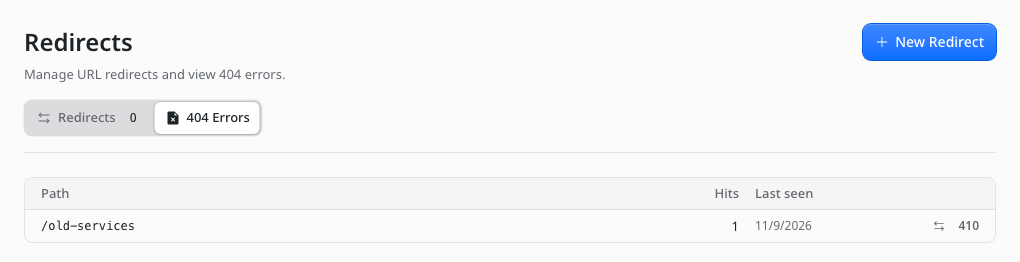
What EmDash does on its own. Under Redirects, 404 Errors lists addresses visitors asked for that do not exist, and you can send each one to the right page. When you change a page’s address, EmDash sends the old address to the new one by itself. We saw all three on our test site. EmDash does not scan your pages for broken links: a broken link is noticed only when someone follows it.
On WordPress you used Redirection and Broken Link Checker.
- Made by: emdashplugins.nl (smrht).
- What it does for your site: checks the links from one saved page to other websites and shows each answer.
- Who sets it up: you, from Registry in the admin.
- Day to day: pick a page, press “Inspect saved links”, then “Check next two links”; it waits a minute before asking the same website again.
- Other accounts needed: none.
- Cost: free.
- Says it works with EmDash 1.4: its listing does not say.
- Seen working on EmDash 1.4.x: 9 November 2026, version 0.1.0: did its job. On our Contact page it found two links to another website and checked the first: it answered “ok”.
- What it does not do: it checks one saved page at a time, and only its links to other websites; it does not fix links.
- Code and licence: public, MIT (GitHub).
- For your developer: registry
@emdashplugins.bsky.social/backlinksbeheer-links(listing); sandboxed.
- Made by: Azydeco Software Ltd.
- What it does for your site: lets you write the “page not found” page in the admin (headline, text, a button, a picture), and makes sure such pages tell search engines the page does not exist.
- Who sets it up: your developer adds it to the site’s code and connects the theme’s not-found page to it; then you write the page in the admin.
- Day to day: nothing; edit the text when you want.
- Other accounts needed: none.
- Cost: free.
- Says it works with EmDash 1.4: yes (1.0.0 or newer).
- Seen working on EmDash 1.4.x: 9 November 2026, version 0.2.2: did its job. After we saved a headline, text and a “Contact us” button, a missing address showed them, still answering “not found”.
- What it does not do: it does not log missing pages or add redirects (EmDash does both), and it does not check links.
- Code and licence: public, MIT (GitHub).
- For your developer: npm
@azydeco/emdash-plugin-custom-404; in-process, with<Custom404>insrc/pages/404.astro.
- Made by: Krushna Raval.
- What it does for your site: finds links between your own pages that lead nowhere, and shows which pages link to a page before you change it. It changes nothing.
- Who sets it up: you, from Registry in the admin.
- Day to day: press “Scan site”; a Broken links table shows the link, the page and an “Open in editor” button. A dashboard card.
- Other accounts needed: none.
- Cost: free.
- Says it works with EmDash 1.4: yes (1.2.0 or newer).
- Seen working on EmDash 1.4.x: 9 November 2026, version 0.1.0: did its job. One scan found the broken link we had put on the Contact page. Its third page, Document, did not open on EmDash 1.4.0.
- What it does not do: it does not check links to other websites, fix links or add redirects.
- Code and licence: public, MIT (GitHub).
- For your developer: registry
@krushnaraval.bsky.social/sitegraph-lite(listing); sandboxed.
Also tried, for a different job: Link Manager by Gatilab makes branded short links on your own address, such as /go/partner; it is not a broken-link checker. Version 0.1.0 installed, and its short link sent visitors where we set it, on 9 November 2026.
Not tried here: Link Guardian by meekmedia and Site Score by ChikuOS list no public code; content-link-check by eisbachcode has its code on GitHub but no published package.
Site Health & Broken Links (ours)
- Made by: Moorage (ours).
- What it does for your site: checks every page’s links on a schedule, lists what is broken and where, and has a checklist of the site’s setup.
- Who sets it up: either: you, from Registry in the admin, or your developer, in the site’s code.
- Day to day: nothing until something breaks; Problems and Checklist tabs and a dashboard card.
- Other accounts needed: none.
- Cost: free.
- Says it works with EmDash 1.4: yes (1.3.0 or newer).
- Seen working on EmDash 1.4.x: 9 November 2026, version 0.2.0: installed; its first check finished after about 10 minutes: 3 pages, 4 links, nothing to fix. It listed our broken link under “Links we could not check”: the test site was not on the public internet, and from there the plugin could not open the site’s own pages, and most checklist rows read “Could not tell”. This test did not show it finding a broken link.
- What it does not do: no SEO score or key-phrase checks; it does not fix links itself.
- Code and licence: public, MIT (GitHub).
- For your developer: registry
@moorage.dev/site-health(listing), npm@moorage/plugin-site-health; in-process or sandboxed.
How to set it up: How to find and fix broken links on EmDash.
Show an offer or a notice: popup and bar plugins
We make one plugin in this job. It is marked (ours).
What EmDash does on its own. Nothing: EmDash has no popup or notice bar.
On WordPress you used Popup Maker, OptinMonster or Hustle.
- Made by: DesiDash Lab.
- What it does for your site: a bar at the top or bottom of every page, or of chosen pages, with a message and a link, shown between two dates, which visitors can close.
- Who sets it up: you install it from Registry in the admin; your developer pastes a short script, shown on its Setup tab, into the theme once.
- Day to day: one form: message, link, position, dates, colours and which pages. Changes reach the site within a minute.
- Other accounts needed: none.
- Cost: free.
- Says it works with EmDash 1.4: its listing does not say; its code says 1.0.0 or newer.
- Seen working on EmDash 1.4.x: 9 November 2026, version 0.1.0: did its job. Our “Closed on 24 December” bar showed at the top of the home page, and was gone after we removed the plugin.
- What it does not do: it shows one bar at a time.
- Code and licence: public, MIT (GitHub).
- For your developer: registry
@desidashlab.bsky.social/announcement-bar(listing); sandboxed.
- Made by: Raphaël Apard (raphaelApard).
- What it does for your site: one banner at the top of every page, with simple formatting (bold, italic, links), shown between two dates and times.
- Who sets it up: your developer adds it to the site’s code, with your time zone; then you write the notice in the admin.
- Day to day: one form: the message, show from and until, an on/off switch and “keep visible while scrolling”. The page says when the notice is showing.
- Other accounts needed: none.
- Cost: free.
- Says it works with EmDash 1.4: yes (1.4.0 or newer).
- Seen working on EmDash 1.4.x: 9 November 2026, version 0.1.0: did its job. Our “Closed on 24 December” notice, in bold with a link, showed at the top of the home page, and was gone after we removed the plugin.
- What it does not do: one notice at a time, on every page (we saw no choice of pages).
- Code and licence: public, MIT (GitHub).
- For your developer: npm
emdash-plugin-site-notice; in-process.
Also tried: Smarter Announcement Bar by Dishant Patel. Version 0.1.0 showed nothing on the site on 9 November 2026; its admin page says it is coming soon. Not tried: WhatsApp Chat Button by DesiDash Lab, because we take at most two plugins per publisher; LLL Timed Notice, which lists no public code.
Popups (ours)
- Made by: Moorage (ours).
- What it does for your site: a top bar, a corner slide-in, a popup or a box inside a page, each with where, which devices, how often and which dates, with results for each.
- Who sets it up: your developer adds it to the site’s code (it is not on the Registry; its page says it adds the bar to the page itself); then you make popups in the admin.
- Day to day: a Popups list with Edit and Preview, a Results tab and Settings; four steps to make one.
- Other accounts needed: none.
- Cost: free.
- Says it works with EmDash 1.4: yes (1.3.0 or newer).
- Seen working on EmDash 1.4.x: 9 November 2026, version 0.2.3: did its job. Our “Closed on 24 December” top bar showed above the home page’s header, and was gone after we removed the plugin.
- What it does not do: it sends no e-mail; forms inside popups need EmDash’s Forms plugin; results count views and clicks, not sales.
- Code and licence: public, MIT (GitHub).
- For your developer: npm
@moorage/plugin-popups; in-process only.
How to set it up: How to add a popup or top bar to EmDash.
Check a page before it goes live: approval and change-history plugins
We make one plugin in this job. It is marked (ours).
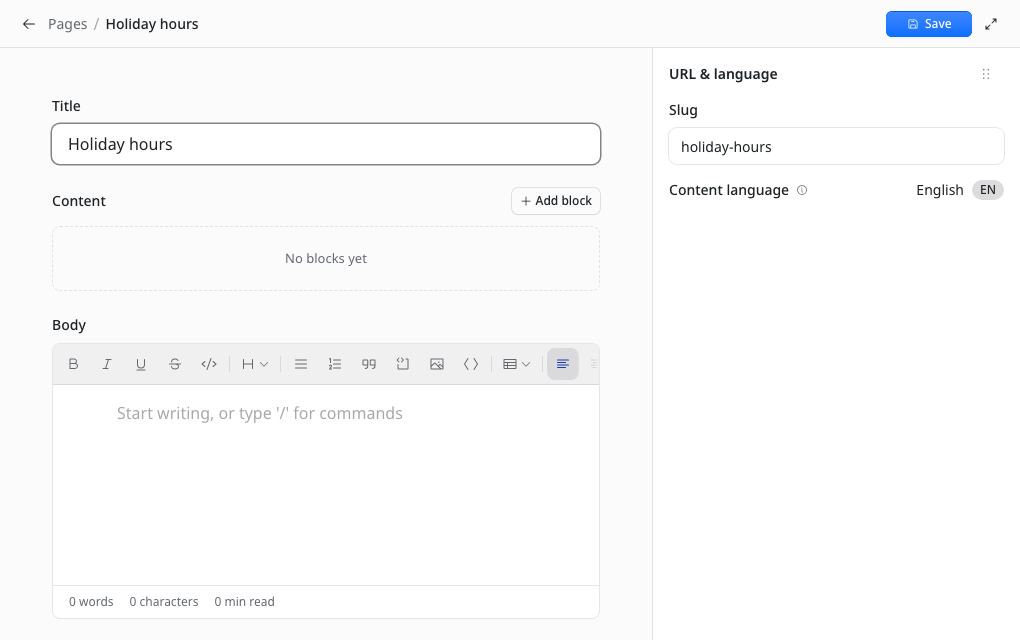
What EmDash does on its own. EmDash has five roles. A Contributor can write drafts but cannot publish, so an Editor or an Admin publishes their work. We saw it: as a Contributor, the editor offered only Save, and the new page stayed a draft. There is no review queue and no note when a page is sent back, and Authors and Editors publish their own work without anyone’s OK. EmDash also keeps earlier versions of each page (Revisions, from EmDash’s docs).
On WordPress you used PublishPress, Simple History or WP Activity Log.
- Made by: EmDash (official plugin).
- What it does for your site: keeps a record of who created, changed or deleted content and media; the dashboard shows the latest changes.
- Who sets it up: you, from Registry in the admin (also on npm).
- Day to day: nothing; a Recent Activity card on the dashboard.
- Other accounts needed: none.
- Cost: free.
- Says it works with EmDash 1.4: yes (0.15.0 or newer).
- Seen working on EmDash 1.4.x: 9 November 2026, version 0.2.2: the dashboard card listed our two saves of the Contact page. Its Audit History page did not open on EmDash 1.4.0.
- What it does not do: it does not hold or approve changes, and it does not restore old versions (EmDash’s own Revisions does).
- Code and licence: public, MIT (GitHub).
- For your developer: registry
@plugins.emdashcms.com/audit-log(listing), npm@emdash-cms/plugin-audit-log; sandboxed.
- Made by: jammaru.
- What it does for your site: rules for each content type, such as “needs a byline”, checked whenever something is published. In Observe mode it only records; in Enforce mode a broken rule stops publishing. AI tools connected to the site can run the same check first.
- Who sets it up: you, from Registry in the admin.
- Day to day: Rules, Overview and JSON tabs, and a message in the editor when a rule stops publishing.
- Other accounts needed: none.
- Cost: free.
- Says it works with EmDash 1.4: its listing does not say; its code says 0.39.0 or newer.
- Seen working on EmDash 1.4.x: 9 November 2026, version 0.1.1: did its job. With a byline rule and enforcement on, publishing our Contact page, which has no byline, was refused: “Preflight blocked publishing: 1 policy error(s).”
- What it does not do: no second person’s OK and no change history; it only records until you switch enforcement on.
- Code and licence: public, MIT (GitHub).
- For your developer: registry
@jammaru.com/preflight(listing); sandboxed.
- Made by: emdashplugins.nl (smrht).
- What it does for your site: checks a page’s search basics (title length, search description, headings, picture descriptions, internal links) when someone presses Publish, and in block mode refuses to publish until the errors are fixed. Warnings never block.
- Who sets it up: you, from Registry in the admin.
- Day to day: a “Failed to publish” message in the editor naming what to fix, a Reports page, and settings for which checks and limits.
- Other accounts needed: none.
- Cost: free.
- Says it works with EmDash 1.4: its listing does not say; its code says 1.0.1 or newer.
- Seen working on EmDash 1.4.x: 9 November 2026, version 0.3.0: did its job. Publishing our Contact page was refused because it had no search description and no internal link, and the Reports page listed it.
- What it does not do: no second person’s OK and no change history; it checks search basics, not spelling or content.
- Code and licence: public, MIT (GitHub).
- For your developer: registry
@emdashplugins.bsky.social/publish-check(listing); sandboxed.
- Made by: Mason James (masonjames).
- What it does for your site: a list of content changes (what, where, when), kept 90 days by default, with filters and a dashboard card. Its own page says it is intentionally narrower than a full audit trail.
- Who sets it up: you, from Registry in the admin.
- Day to day: a History page with counts for the last day and week and filters, and a Recent Activity card.
- Other accounts needed: none.
- Cost: free.
- Says it works with EmDash 1.4: its listing does not say.
- Seen working on EmDash 1.4.x: 9 November 2026, version 0.2.0: did its job. After we edited and published the Contact page, it listed both changes.
- What it does not do: no approval or blocking; the rows we saw did not name who made the change.
- Code and licence: public, MIT (GitHub).
- For your developer: registry
@masonjames.com/simple-history(listing); sandboxed.
Not tried here: Editorial Review & Approvals by AgenticEcom, Pinnacle Editorial Workflow, and Preflight by meekmedia list no public code.
Content Approval (ours)
- Made by: Moorage (ours).
- What it does for your site: a second person OKs a page before it goes live: Publish sends it for approval instead. You choose who needs an OK; it reminds you of a missing search description or sharing picture.
- Who sets it up: either: you, from Registry in the admin, or your developer, in the site’s code.
- Day to day: Waiting, Sent back and History tabs, and a dashboard card.
- Other accounts needed: none, but a second person on the site to approve.
- Cost: free.
- Says it works with EmDash 1.4: yes (1.3.0 or newer).
- Seen working on EmDash 1.4.x: 9 November 2026, version 0.3.0: with “I need someone else’s OK” on, our edit to the Contact page waited for approval and the live page did not change. Our test site had one user, so the approve step itself was not seen.
- What it does not do: no SEO score or link checks; it is not a full change log.
- Code and licence: public, MIT (GitHub).
- For your developer: registry
@moorage.dev/approvals(listing), npm@moorage/plugin-approvals; in-process or sandboxed.
How to set it up: How to approve pages before they go live on EmDash.
Keep a copy you can take anywhere: backup and export
What EmDash does on its own. EmDash’s docs show how to keep a copy of the database and the media for each kind of database, such as Time Travel on Cloudflare (Backups and recovery). Settings, Transfer exports the whole site as one package that another EmDash site can import (Site transfer). We did not test these.
On WordPress you used UpdraftPlus or another backup plugin.
- Made by: inari.diy (inaridiy).
- What it does for your site: saves each page or post as a text file in a GitHub repository whenever it changes, with “Export all” for what is already there.
- Who sets it up: you, from Registry in the admin; you need a GitHub repository and an access token.
- Day to day: one settings page with Export all and the time of the last copy.
- Other accounts needed: a GitHub account.
- Cost: free.
- Says it works with EmDash 1.4: its listing does not say; its code says 1.1.0 or newer.
- Seen working on EmDash 1.4.x: 9 November 2026, version 0.1.0: installed; its page opened (“Not connected”). Exporting: not run, needs a GitHub account.
- What it does not do: it does not copy media files or the database, and it is not a restore tool.
- Code and licence: public; MIT, its listing says (GitHub).
- For your developer: registry
@inari.diy/github-sync(listing); sandboxed.
Serve two languages: translation plugins
What EmDash does on its own. Once your developer lists the languages in the site’s settings, each page can have a version in each language, which you make in the admin, and EmDash tells search engines which version is which (EmDash’s languages guide).
On WordPress you used WPML or Polylang.
- Made by: swissky.
- What it does for your site: shows which pages exist in which language, lists the missing and out-of-date ones, and makes translation drafts, by hand or with a translation service (DeepL, Google, Azure, OpenAI or Cloudflare AI Gateway).
- Who sets it up: you, from Registry in the admin (also on npm); your developer lists the languages in the site’s settings first.
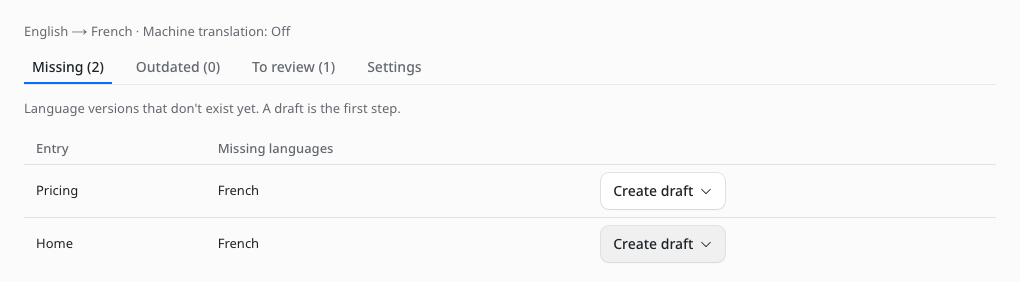
- Day to day: a Status page with Missing, Outdated and To review, and “Create draft” for each page; Settings.
- Other accounts needed: none to translate by hand; machine drafts need an account with one of those services.
- Cost: free; translation services may charge.
- Says it works with EmDash 1.4: yes (1.0.0 or newer).
- Seen working on EmDash 1.4.x: 9 November 2026, version 0.2.2: did its job, by hand. With French added, it listed our three pages as missing in French; “Create draft” made a French draft of the Contact page, which moved to To review. Machine drafts: not run, needs an account.
- What it does not do: it does not translate without a service account, and it does not add a language switcher to the theme.
- Code and licence: public, MIT (GitHub).
- For your developer: registry
@swiss.ky/linguadash(listing), npmemdash-plugin-linguadash; sandboxed.
Pictures that load fast and describe themselves: image plugins
What EmDash does on its own. EmDash has a media library. Each place a picture is used keeps its own description (alt text) and caption, which you write (EmDash’s media guide).
On WordPress you used Smush or ShortPixel.
- Made by: La Symphonie.
- What it does for your site: writes descriptions (alt text) for pictures with Anthropic’s Claude when they are uploaded, and fills missing ones when pages are saved.
- Who sets it up: you, from Registry in the admin; then you add an Anthropic API key.
- Day to day: an Alt text page with “Find images without alt text”, and a dashboard card.
- Other accounts needed: an Anthropic account.
- Cost: free; Anthropic charges for use.
- Says it works with EmDash 1.4: its listing does not say; its code says 1.0.0 or newer.
- Seen working on EmDash 1.4.x: 9 November 2026, version 0.3.0: installed; its page and card opened and said no alt text is written until a key is added. Writing alt text: not run, needs an Anthropic account.
- What it does not do: it does not resize pictures, and it does nothing without the key.
- Code and licence: public, MIT (GitHub).
- For your developer: registry
@lasymphonieagency.com/ai-alt-text(listing); sandboxed.
- Made by: RJS Tech Solutions LLP.
- What it does for your site: (from its own page) makes smaller copies of each picture once, with Cloudflare Images, and serves those, so pages load lighter pictures.
- Who sets it up: your developer, who also adds a second storage bucket on Cloudflare.
- Day to day: not seen in the test.
- Other accounts needed: a Cloudflare account with R2 and Cloudflare Images.
- Cost: free; Cloudflare charges beyond its free allowances.
- Says it works with EmDash 1.4: yes (1.1.0 or newer).
- Seen working on EmDash 1.4.x: not run: needs a Cloudflare account. It runs only on Cloudflare, and our test site ran on Node.js.
- What it does not do: not seen in the test.
- Code and licence: public, MIT (GitHub).
- For your developer: npm
emdash-plugin-r2-variants; in-process.
Change a layout without code: page-building plugins
What EmDash does on its own. Pages are made of the blocks your theme defines; you add and reorder them in the editor. A new kind of block needs your developer (EmDash’s blocks guide).
On WordPress you used Elementor or the block editor.
- Made by: PerkyZZ999.
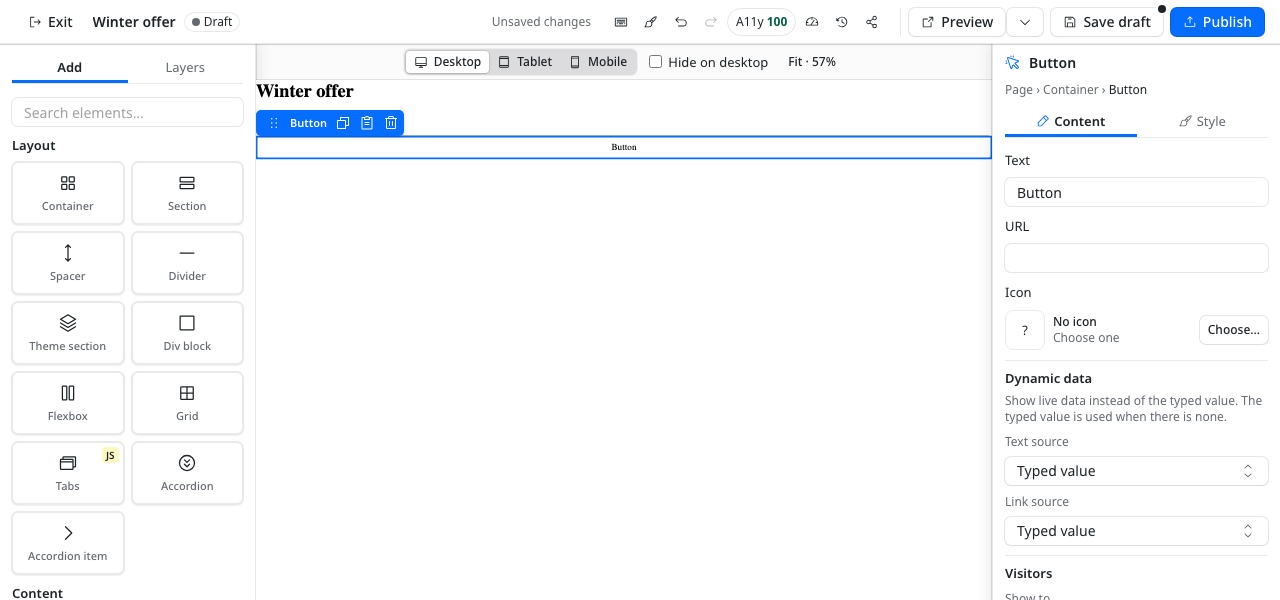
- What it does for your site: a drag-and-drop page builder (sections, grids, tabs, headings, text, buttons, pictures, and forms with EmDash’s Forms plugin), with version history and an accessibility score in the editor.
- Who sets it up: your developer adds it to the site’s code, with an address for its pages; then you press “Set up EmVB” once and build pages in the admin.
- Day to day: a list of pages, and a full-screen editor with Add and Layers panels, desktop, tablet and phone views, Save draft and Publish.
- Other accounts needed: none.
- Cost: free.
- Says it works with EmDash 1.4: yes (1.0.0 or newer).
- Seen working on EmDash 1.4.x: 9 November 2026, version 0.9.0: did its job. A “Winter offer” page with a heading and a button, built and published in the admin, showed at the address we added.
- What it does not do: it does not restyle the theme’s existing pages, and its pages need the address your developer adds.
- Code and licence: public, MIT (GitHub); its icon sets keep their own licences.
- For your developer: npm
@perkyzz/emvb; in-process, with<EmVBPage>in a page route.
Take bookings and sell tickets: events plugins
What EmDash does on its own. Nothing: EmDash has no events or bookings.
On WordPress you used The Events Calendar or a booking plugin.
- Made by: semics.co.uk.
- What it does for your site: bookings and ticket sales for events: a bookings list with search and a tool to delete someone’s personal data, attendees per event, an event editor, a setup check, and a Ticket sales dashboard card.
- Who sets it up: you, from Registry in the admin. The site needs an events content type with start, end, time zone and venue fields (your developer, or Content Types in the admin), and Turnstile keys for its checkout check.
- Day to day: not seen in the test.
- Other accounts needed: a Cloudflare account for Turnstile, which its setup check recommends.
- Cost: free.
- Says it works with EmDash 1.4: its listing does not say; its code says 1.2.0 or newer.
- Seen working on EmDash 1.4.x: 9 November 2026, version 1.0.0-rc.8, a release candidate: installed; its four pages opened, and its setup check named the missing events type. Taking a booking was not tested: we skipped that setup step.
- What it does not do: not seen in the test.
- Code and licence: public, MIT (GitHub).
- For your developer: registry
@semics.co.uk/semics-events(listing); sandboxed.
Jobs EmDash already does: search, speed and roles
- Search. Each content type can have full-text search on the fields marked searchable (EmDash’s collections guide).
- Speed. EmDash works with Astro’s page cache and clears a cached page when its content changes (Route caching).
- Roles. Subscriber, Contributor, Author, Editor and Admin; see Check a page before it goes live above.
No plugin is needed for these. Search and speed are from EmDash’s docs; we did not test them here. Setting up the site itself: How to set up an EmDash site on Cloudflare for a business.
For a shop or a members area
Not tested in this round: DashCommerce by emdashCommerce, DinkusKit Commerce by smokyco and Payments by HandyPlugins for a shop, and emdash-better-auth by theweekendprojects for members.
Accessibility checks and newsletters
Not tested in this round: plugins for accessibility checks and for newsletter sign-ups.
Where EmDash plugins come from, and what they cost
Is there an EmDash plugin marketplace? Yes: EmDash’s Marketplace is now called the Registry. You install from it in your admin, once your developer has switched it on, or your developer adds a plugin from npm (how to find and install EmDash plugins).
Are EmDash plugins free? Every plugin we tested here is free to install. Some need an outside account that may charge, such as an e-mail or translation service; each entry says which.
Change log
- 9 November 2026: first version. 42 plugins from 30 publishers installed one at a time on EmDash 1.4.0 (Node.js).
We check this page every quarter, and within two weeks of each new EmDash minor release. Publishers: write to hello@moorage.dev and we test your plugin again within 14 days.
Stuck on a step? Email hello@moorage.dev.
What should we make next?
Tell us the job you would like a plugin to do. We read every answer and use your email only to reply to it; release emails come only if you tick the box.