On this page
What it does
Schema markup
Every page gets one connected description of who you are and what the page is, in the format search engines read (structured data, JSON-LD). It covers your organisation, or you as a person, or your local business with its address and opening hours. It also describes the website, the page itself, blog posts and articles with their authors, services, team members and breadcrumbs.
A page type for every kind of content
The plugin guesses what each content type is from its name. You can change the guess for a whole content type or for a single page.
Pages to fix
A list of the pages that have a missing description, a title shared with another page, or a canonical that points somewhere else. Each row links to the page. There is no score and no traffic light, and once you’ve fixed everything the list is empty.
Hide from search
You can keep a whole content type out of Google. While anything is hidden, the SEO page shows a warning so that nobody forgets.
Redirects
Add, change and remove redirects by hand. If you have a list exported from Redirection, Yoast SEO Premium or Rank Math, paste it in and the plugin imports it.
Google preview in the editor
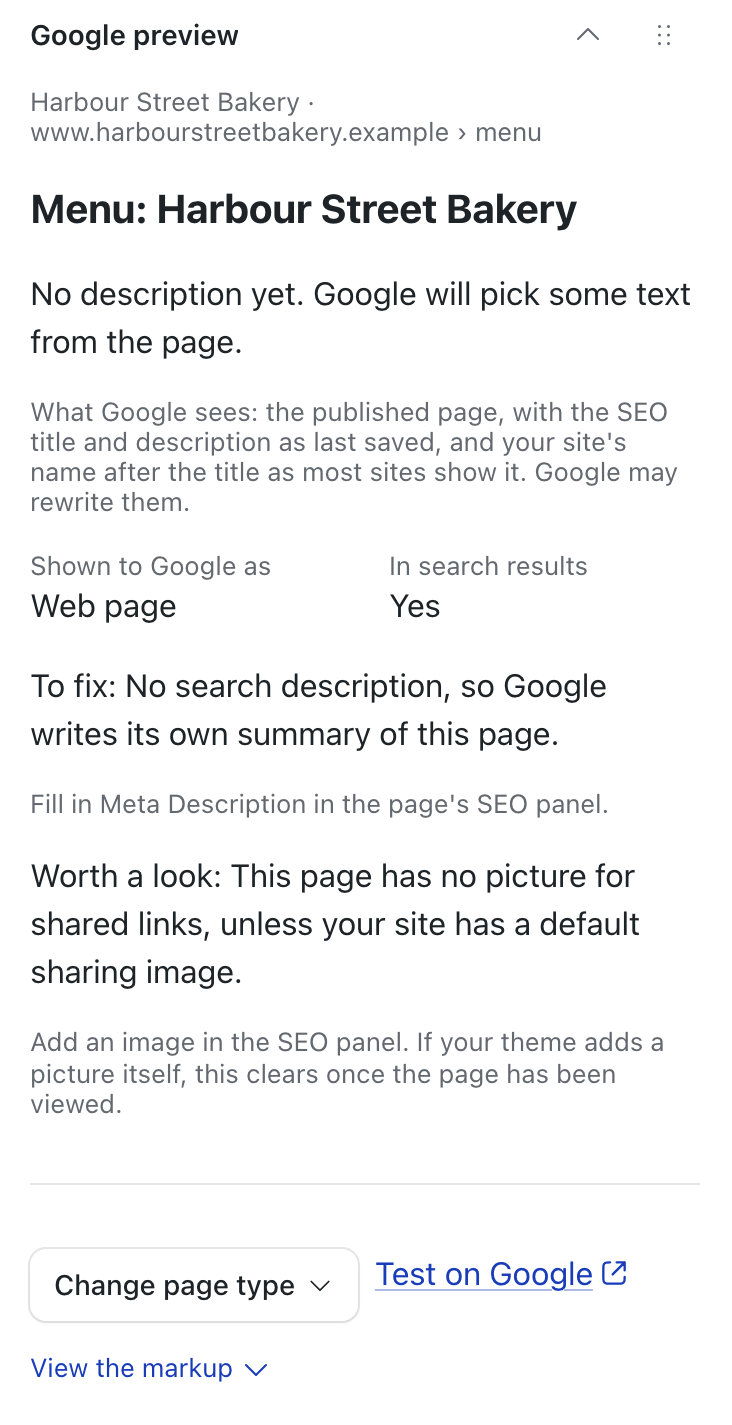
While you edit a page you can see its address, title and description as Google may show them, along with anything that needs fixing.
Try the Google preview
The plugin shows this beside every page in the editor, as the page was last published. Try it here: type a title and a description.
harbourstreetbakery.example
harbourstreetbakery.example › menu
Menu: fresh bread, cakes and coffee | Harbour Street Bakery
Baked every morning on Harbour Street. See today’s bread, cakes and coffee, with today’s specials and opening hours.
This runs in your browser, and nothing you type is sent anywhere. The title is measured against roughly 580 pixels and the description against about 155 characters; Google publishes no limit, so every warning says “probably”. Google also rewrites titles, and sometimes picks its own description.
Install
How to install a plugin on EmDash: the registry or npm
Install it from Registry in your EmDash admin. If you’d rather add it in code:
npm install @moorage/plugin-seo// astro.config.mjs
import seo from "@moorage/plugin-seo";
import { defineConfig } from "astro/config";
import emdash from "emdash/astro";
export default defineConfig({
integrations: [emdash({ plugins: [seo] })],
});Listed under plugins, it runs in your site’s own process, which works on any EmDash site. To run it sandboxed, list it under sandboxed instead; that needs a sandbox runner.
Then open SEO in the admin sidebar. The plugin works before you change a single setting. Answer one question about who the site is for and the result becomes more accurate.
The registry lists it as @moorage.dev/seo and npm lists it as @moorage/plugin-seo. They are the same plugin.
This site runs on EmDash and uses this plugin.
Screenshots



What it does not do
- It does not write the page title, the sitemap or robots.txt. EmDash and your theme do those.
- There is no keyword density score and no readability score. We left them out on purpose.
- It has no FAQ, Product or Event schema yet. Until it does, add a JSON field named
json_ldto a content type and paste in any schema.org object. - It handles one business location.
- EmDash has no regular-expression redirects. On import, exact addresses and “everything under a folder” rules are converted. Any other pattern is listed so that you can rewrite it yourself.
Permissions
The plugin asks to read your content, bylines and content structure. It needs those to check pages and build the markup. It also asks to manage redirects, so that you can add and import them. It makes no requests to any outside service.
Questions
Is it free?
Yes, on any number of EmDash sites, with no account and no licence key. It is open source under the MIT License; the licence page says in plain words what you may do with it.
Is there a Yoast alternative for EmDash?
Yes, in two parts. EmDash itself covers titles, descriptions, sitemaps and canonicals. This plugin adds the schema graph, the page checks, the Google preview and the redirects import, which accepts redirects exported from Yoast SEO Premium. It has no keyword or readability score.
How do I add schema markup to EmDash?
Install this plugin. Every page gets structured data (JSON-LD) straight away. To make it accurate, answer the one question about who the site is for. The setup guide walks through it.
How do I import redirects from WordPress?
Export them from Redirection, Yoast SEO Premium or Rank Math. In the admin, open SEO and then Redirects. Press “Import from WordPress”, paste the list and press “Check list”. Nothing is added until you confirm.
How do I hide a content type from Google?
Open SEO, then Settings, then Content types, and choose to hide that content type.
Is there an SEO score?
No, and that is deliberate. You get a list of pages to fix, and when you have fixed them the list is empty.
Does it need an account?
No. Nothing in the plugin connects to Moorage, and it is the same plugin on every EmDash site.
What is the line at the foot of the plugin’s page?
Only admins see it: “Help · More free plugins · by Moorage”. Help opens the plugin’s setup guide; editors never see the line. To hide it, switch on “Hide the help line at the foot of this page” at the bottom of the Settings tab and press Save.
Where do I report a problem?
Open an issue on GitHub. If it is a security problem, email security@moorage.dev instead.
Report a problem on GitHub: what happened, and your EmDash and plugin versions.
What should we make next?
Tell us the job you would like a plugin to do. We read every answer and use your email only to reply to it; release emails come only if you tick the box.