Skip to the content
moorage
  • Plugins
  • Guides
  • Blog
  • About

Six plugins released, two more on the list.

Launch day is the easy part.

Moorage makes free plugins for EmDash, the open-source CMS from Cloudflare. Each one takes over a job that starts once a site is live, beginning with how its pages appear on Google.

See the pluginsRead the guides

Moorage is independent. It is not affiliated with Cloudflare or the EmDash project.

A chart of what Moorage has builtA coastline with depth contours. On the land, in upright lettering, are SEO and Schema Markup, Analytics and Cookies, Lead Delivery, Site Health and Broken Links, Popups and Content Approval, the 6 released plugins, marked with a cleat. Further out, with dashed marks, are the 2 planned plugins: Backup and Restore and Marketing Theme.Backup & RestoreMarketing ThemeSEO & SchemaMarkupAnalytics &CookiesLead DeliverySite Health &Broken LinksPopupsContentApprovalSEO & SchemaMarkupAnalytics &CookiesLeadDeliverySite Health &Broken LinksPopupsContentApprovalBackup &RestoreMarketingTheme
Upright: released. Italic: not released yet.

Starting a new site? Set up an EmDash site for your business.

Moving from WordPress? Move a WordPress site to EmDash.

Latest release9 November 2026Site Health & Broken Links 0.3.0See what a move from WordPress left behind, in the new Left over from WordPress group.

Released

Start here: SEO & Schema Markup

EmDash already writes your titles, descriptions and sitemap. This plugin adds the structured data that tells Google what each page is, and gives you a plain list of the pages that need fixing. If you’re moving from WordPress, paste in your old redirects and it brings them across.
Cost
Free
Version
0.2.1
Requires
EmDash 1.2.0 or newer
Read about the plugin

EmDash registrynpmSource

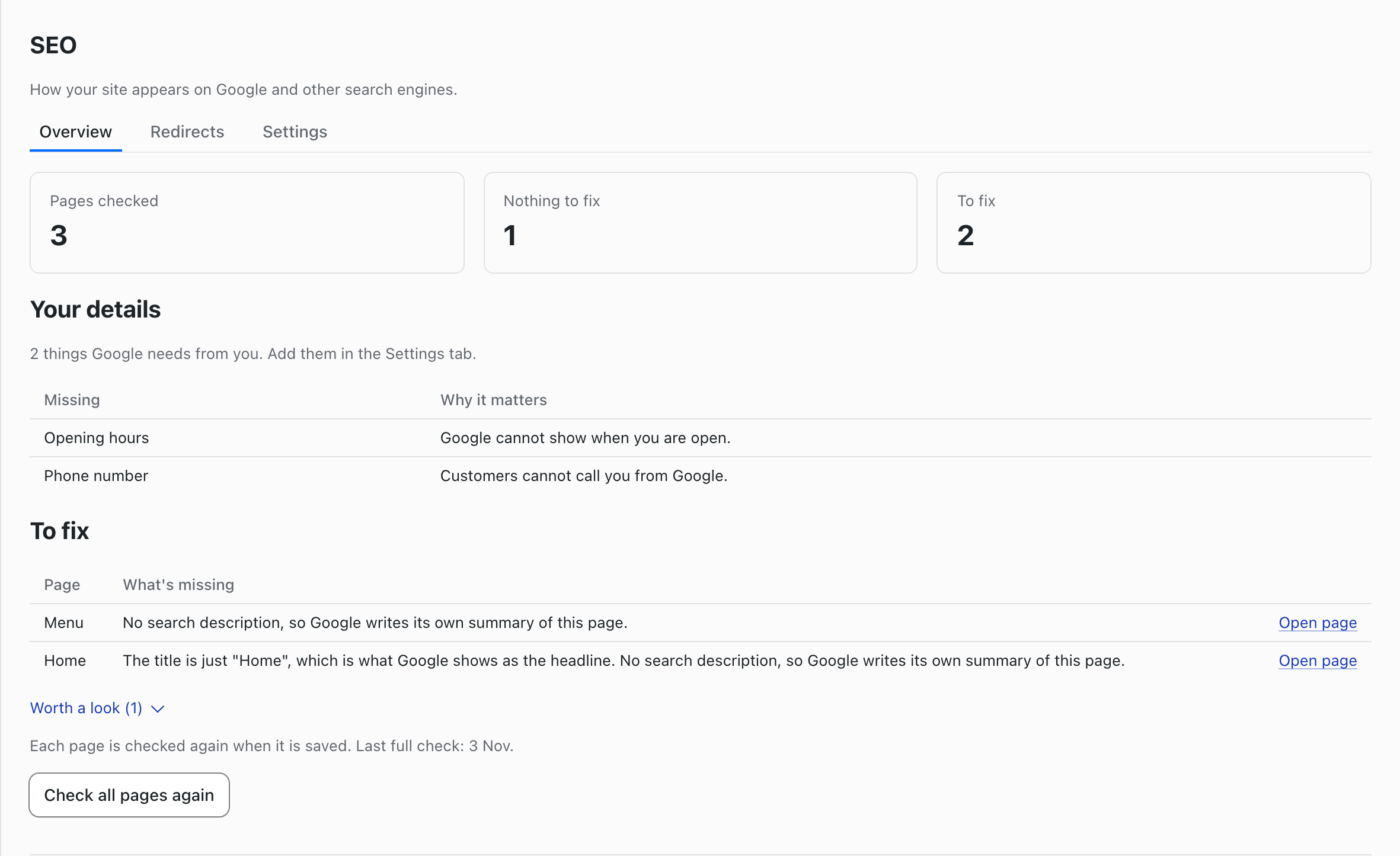
The SEO page in the EmDash admin, with two pages left to fix.
The plugin's Overview tab. Three counters read: pages checked 3, nothing to fix 1, to fix 2. Below them, a table of two details Google still needs, opening hours and a phone number, and a table of the two pages to fix, Menu and Home, each with a plain sentence saying what is missing and a link to open the page.
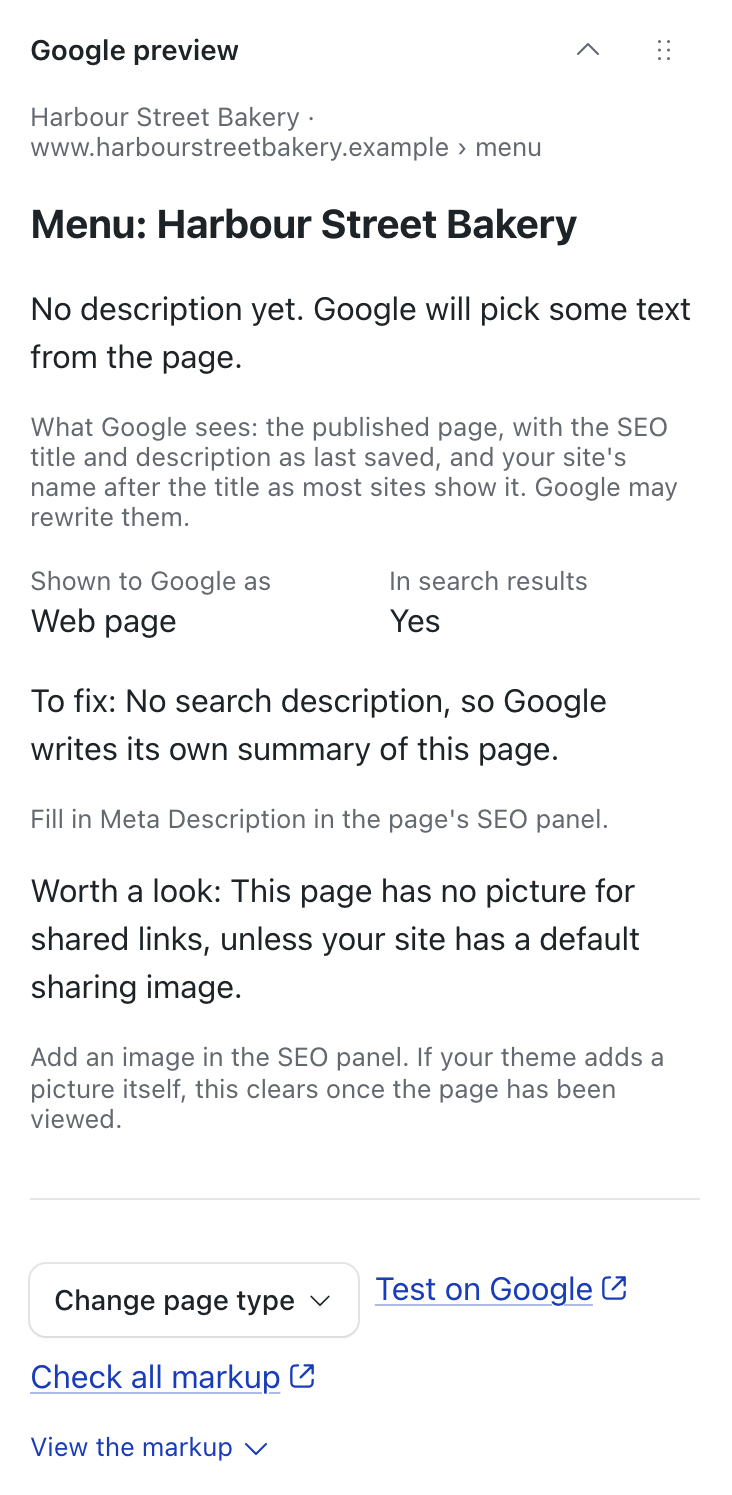
The Google preview panel, beside the page you are editing, with Test on Google and Check all markup.
The Google preview panel for a page called Menu. It shows the address and title as Google may show them, says there is no description yet, lists the page type as Web page and that the page is in search results, names one thing to fix, no search description, and one worth a look, no picture for shared links. Below them are Change page type, Test on Google, Check all markup and View the markup.

Planned

On the list

These aren’t released yet, and neither has a date.

  • Backup & Restore
  • Marketing Theme

All plugins, and what each will do

Latest guides and release notes

All guides

  1. Release9 November 2026

    Site Health & Broken Links 0.3.0

    A Left over from WordPress group lists what a move left in your pages: shortcodes shown as text, empty blocks, links to WordPress addresses, coded slugs and pictures with no alt text.

  2. Release9 November 2026

    SEO & Schema Markup 0.2.1

    Moved from WordPress? A Yoast or Rank Math description the page does not use yet is no longer called missing: the pages to fix say how to copy it in. The Google preview says when it shows the excerpt.

  3. Guide9 November 2026

    EmDash plugins for a business site, by the job they do, tested on 1.4.x (November 2026)

    42 EmDash plugins from 30 publishers, tested one at a time on EmDash 1.4.0 and sorted by job: forms, e-mail, SEO, cookie banners, broken links, popups.

  4. Guide9 November 2026

    How to move a WordPress site to EmDash: a tested migration, step by step

    We moved a test WordPress site with Yoast, Redirection and Contact Form 7 to EmDash 1.4.0 with the EmDash Exporter: the steps, and what broke.

  5. Release5 November 2026

    Analytics & Cookies 0.4.0

    The cookie banner speaks your site’s language, YouTube and Vimeo videos and Google maps wait for consent, and Plausible, Umami, LinkedIn and TikTok join the tools.

What you can hold us to

Every plugin is free, on as many sites as you like. There is no account to create and no licence key to enter.

Each one does its whole job on any EmDash site from the day you install it, and makes no requests to an outside service unless you connect one yourself.

The code is open source under the MIT License, so you can read exactly what a plugin does before you install it. The licence page says in plain words what you may do with it.

We keep things small on purpose. A plugin has one page and a handful of settings, because the person using it has a business to run.

And you can write to us. If a plugin misbehaves, if something here is unclear, or if there is a job on your site that the next plugin should do, the address is hello@moorage.dev.

moorage

Moorage (say MOOR-ij; it rhymes with storage) is the word for a berth, the place where a boat is tied up once the voyage is over. Our plugins are for that part of a website’s life: the upkeep after launch.

Plugins

  • SEO & Schema Markup
  • Analytics & Cookies
  • Lead Delivery
  • Site Health & Broken Links
  • Popups
  • Content Approval
  • All plugins

Learn

  • Guides
  • Blog
  • Release notes (RSS)

Company

  • About
  • Licence
  • Privacy

Contact

  • hello@moorage.dev
  • Report a problem
  • Report a security problem
  • GitHub

© 2026 GoSi Tech. Moorage is a product of GoSi Tech.

Moorage is independent and is not affiliated with Cloudflare or the EmDash project.

Cookie settings